See the day clearly.
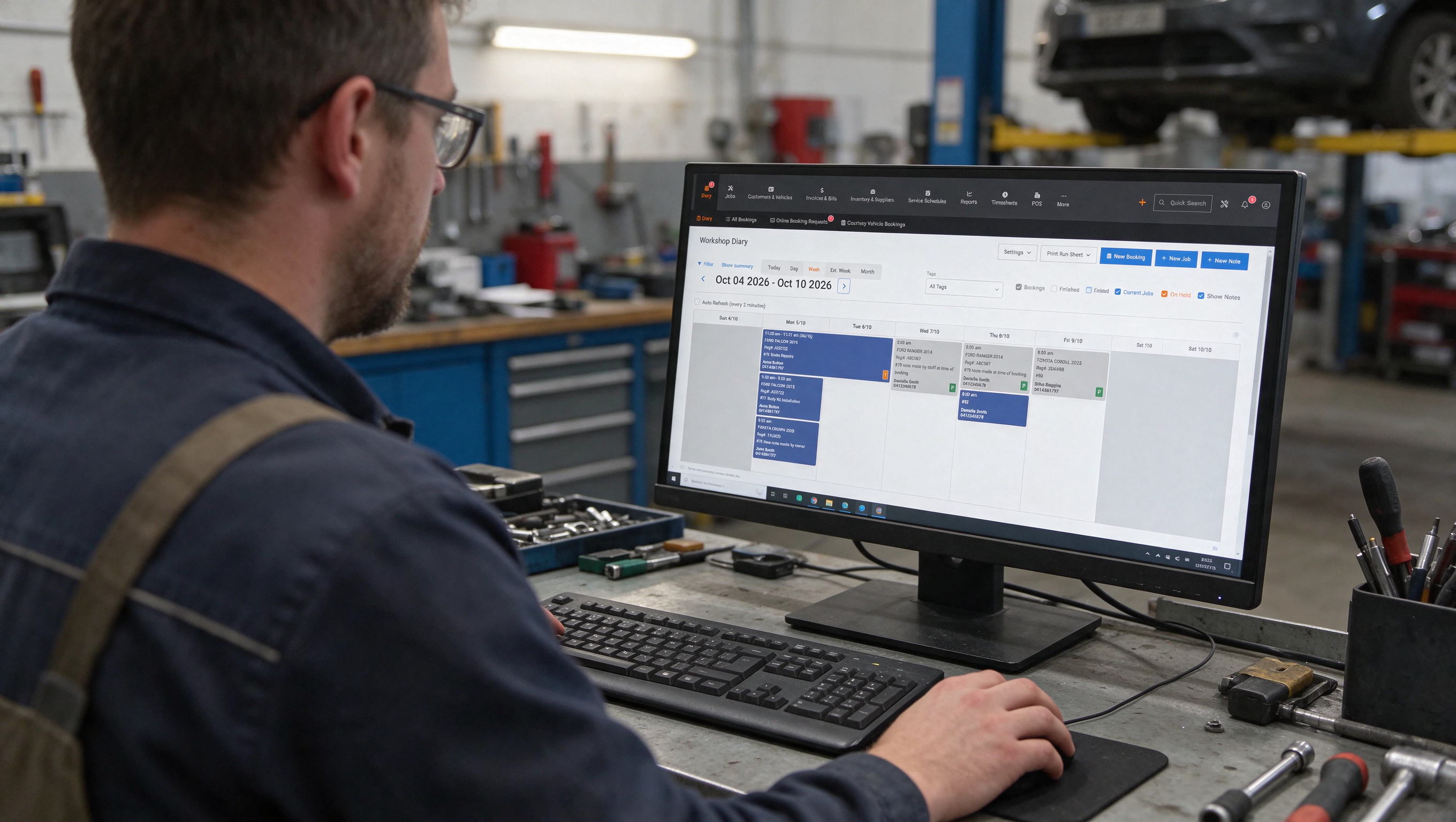
Through the built-in diary, view bookings, jobs on hold and technician capacity at a glance, before the first car reaches a hoist.
- Built-in diary
- Bookings
- Jobs

Bookings, jobs, customers, parts, invoices and service reminders - connected in one clear workspace built for the way workshops actually move.
20,000+ mechanicsusing MechanicDesk every day
MechanicDesk gives you one current view of the workshop - from the first booking to the final invoice.
You should not have to walk the floor, check three systems or ask twice to know what is happening in your own workshop.
Through the built-in diary, view bookings, jobs on hold and technician capacity at a glance, before the first car reaches a hoist.
Turn bookings into jobs and keep notes, photos, approvals, parts and labour with the work as it moves through the team.
Move completed work into the invoice, keep payment status visible and bring the customer back with timely reminders.
Keep accounting, payments, suppliers and customer communication moving without entering the
same information again
Finished work in MechanicDesk is sent to Xero. Customers, suppliers, invoices, bills and payments move across as the job is completed, so the same sale is not typed into two systems.
MechanicDesk sends customers, suppliers, stock, invoices and payments to MYOB AccountRight or MYOB Essentials. The online file stays in step with the workshop without a second round of data entry.

From the job, look up parts in NAPA PROLink using the vehicle already in MechanicDesk. Trade pricing comes back onto the job, and the order goes to NAPA without a phone call.

Look up parts and logbook services in Repco Navigator Pro from the job. The vehicle goes across with the search, and labour, parts and your trade pricing come back ready to order and invoice.

Type a New Zealand registration in MechanicDesk and CarJam fills in the vehicle. A new job starts from an accurate vehicle record instead of details copied off the plate by hand.
Look up and order Burson parts from the job. The vehicle on the hoist is sent to EzyParts, and the parts you choose come back onto the job with your trade pricing.

Look up CoolDrive parts from the job in MechanicDesk. The vehicle details go with the search, and the parts you select come back onto the job with your trade pricing.
Order from the Autopro network without leaving the job. MechanicDesk sends the vehicle details across, and the parts you pick come back with your trade pricing.

Look up HSY parts from the job. MechanicDesk sends the vehicle with the search, and the parts you choose come back onto the job with your trade pricing.

Look up Auto One parts from the job. The vehicle goes across with the search, and the parts you select come back onto the job with your trade pricing.

Order Autolign parts from the job through EzyParts. MechanicDesk sends the vehicle details across, and the parts you choose come back onto the job with your trade pricing.
Order BNT parts from the job through EzyParts. The vehicle on the job is sent with the search, and the parts you select come back with your trade pricing.

MechanicDesk sends customers, suppliers, invoices, bills and payments to QuickBooks Online as the work is finished. The accounts file reflects the workshop without the same sale being entered twice.

Take a card payment from the invoice and MechanicDesk sends the amount to the Windcave terminal. When the card goes through, the payment is recorded on the invoice.
MechanicDesk posts into the Slack channels you choose when a booking is made, a booking request arrives, or a job is finished. The team sees what changed without opening another screen.

MechanicDesk keeps your customer and supplier contacts in Mailchimp. Promotions, reminders and newsletters go to the people already in the workshop system, without exporting a list.
Take a card payment from the invoice and MechanicDesk sends the amount to the Nuvei terminal. When the payment succeeds, it is saved against that invoice.

For Australian workshops in the AMS Rewards programme. Recognise an auto club member on the job, apply your member discount, and report qualifying sales back to AMS.




Hear it from those who use MechanicDesk every day

Create, reschedule or delete bookings in just a few clicks. Bookings are readily convertible to jobs, saving you time.

Quick and easy invoicing/quoting with preconfigured invoice items. Convert invoices/quotes to jobs or bookings directly.

Know exactly what your workshop has in stock at all times. Paired with our stock alert and stock reordering helpers, your workshop will never run out of stock again.

Easily know which vehicles are due or overdue for service. Easily send reminders to your customers via both email and SMS.

Better understand your business with our reporting system - everything from sales and received payments to stock value and employee efficiency.

Managing multiple workshops is a breeze with MechanicDesk. View reports, move stock, etc. all in one place.

The essence of MechanicDesk - keeping you up to date with each and every job in your workshop at a glance. Manage jobs with your colleagues centrally and in real time.

Easily store your workshop's customers details for use throughout the system via MechanicDesk's intelligent auto-suggest and auto-complete functions.
Reorder from your trusted suppliers in a dash. Stay on top of your bills and bill payments with ease.
Make lightning quick sales on the spot with only a few clicks. If you have barcode scanners and label printers, even better!
We help you import your workshop data so you don't have to start over from scratch. Your data is available to you at all times.
We believe that software is only as good as the support that follows it. Your support team is here whenever you need us, and that's a promise.

| Plan · Australia | Starter | Small | Most popular Team | Large |
|---|---|---|---|---|
| Monthly price | $85.00/ month + GST | $115.00/ month + GST | $150.00/ month + GST | $250.00/ month + GST |
| Included users | 1 user/employee | 3 users/employees | 6 users/employees | 15 users/employees |
| Extra user / month | + $15/m | + $15/m | + $10/m | + $10/m |
| Per SMS | + $0.10 | + $0.10 | + $0.10 | + $0.10 |
| Stock items | 50,000 | 100,000 | Unlimited | Unlimited |
| Free trial | 14 days free trial | 14 days free trial | 14 days free trial | 14 days free trial |
| Support | Full support from our support team | Full support from our support team | Full support from our support team | Full support from our support team |
| Most popular | Sign Up | Sign Up | Sign Up | Sign Up |
Customized print templates allow you to have your own uniquely designed invoice, job card, quote etc..
Capture your customer signature for job card and purchasing authorizations directly from your phone or tablet.
Capture short videos on the MechanicDesk mobile app and attach them to jobs. Send large email attachments as links instead of files. Keep copies of invoices, quotes, job cards and purchase orders you send. Store and share important workshop documents online with your team.
Connect MechanicDesk with external equipment integration services such as Foxwell, Bosch and more.
* Available at additional charges, please contact our support for more details
Changing workshop systems is easier when your history comes with you.
Whether you are leaving an older platform or consolidating tools, we help you move across without losing the records your workshop relies on.
Moving from Workshop Software, SAM, AM-Win, Workshop Mate or another workshop management system? Our team supports imports from most major workshop platforms and can help move the data available from your current system.
Export your MechanicDesk data whenever you need it - for reporting, backups or moving on. It is your business information, and you stay in control of it.
Yes. MechanicDesk has Apple and Android mobile apps. Technicians can work with digital job cards, checklists, notes and parts, and can add job photos or videos with the storage add-on.
Yes. Use MechanicDesk’s online booking form, embed it on your website or connect a custom form through the API. Requests stay in the diary for reception to review, while digital approvals are available through the Digital Signature add-on.
MechanicDesk’s Xero connection synchronises customers, suppliers, stock and payments in both directions. Finalised invoices, credit notes and bills are sent from MechanicDesk to Xero.
Standard onboarding and implementation support are usually included. The Melbourne-based team can provide Zoom demonstrations, migration help and initial training, with additional training available free for up to six months.
Yes. If your current system can export usable files, MechanicDesk can import a wide range of workshop data. A test migration can be completed in a trial account, and most imports take one to three working days depending on the data.
No. Subscriptions are month-to-month with no minimum term, cancellation notice period or cancellation fee. Your MechanicDesk data can be exported at any time without an additional export fee.
MechanicDesk supports service and booking reminders, confirmations, quote approvals, vehicle-ready notifications and overdue invoice reminders. Available email or SMS delivery depends on the workflow, and communication templates can be customised.
Reports cover technician productivity, labour efficiency, gross profit, parts margins, job profitability, outstanding accounts, stock valuation and sales. Reports can be exported to Excel or PDF.
Short, practical walkthroughs for getting started and managing your workshop.
Loading demo videos…
Please click the button below to access our online manual
Online ManualOur support line numbers are
We perform all support/demo functions via TeamViewer
Book a demoPlease click the button below to send us an online message
Message14 days free trial · No installation required · Full support from our support team
Autodeck Pty. Ltd.
Suite 2, Level 10, 34 Queen Street, Melbourne, Victoria 3000, Australia


